A number without a source is a rumour.

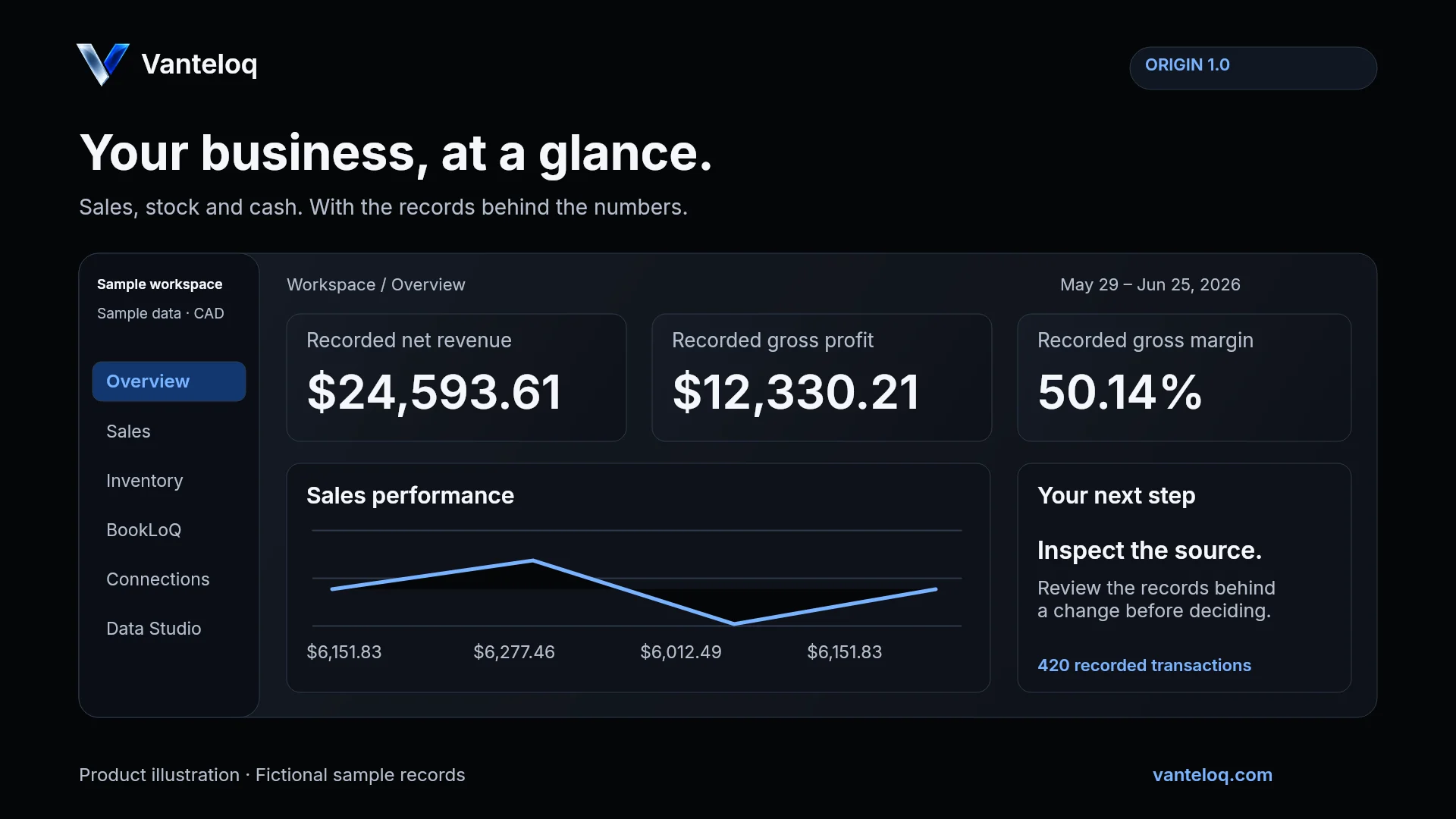
Your business, at a glance.

Sales, stock and cash. With the records behind the numbers.

Open the demo
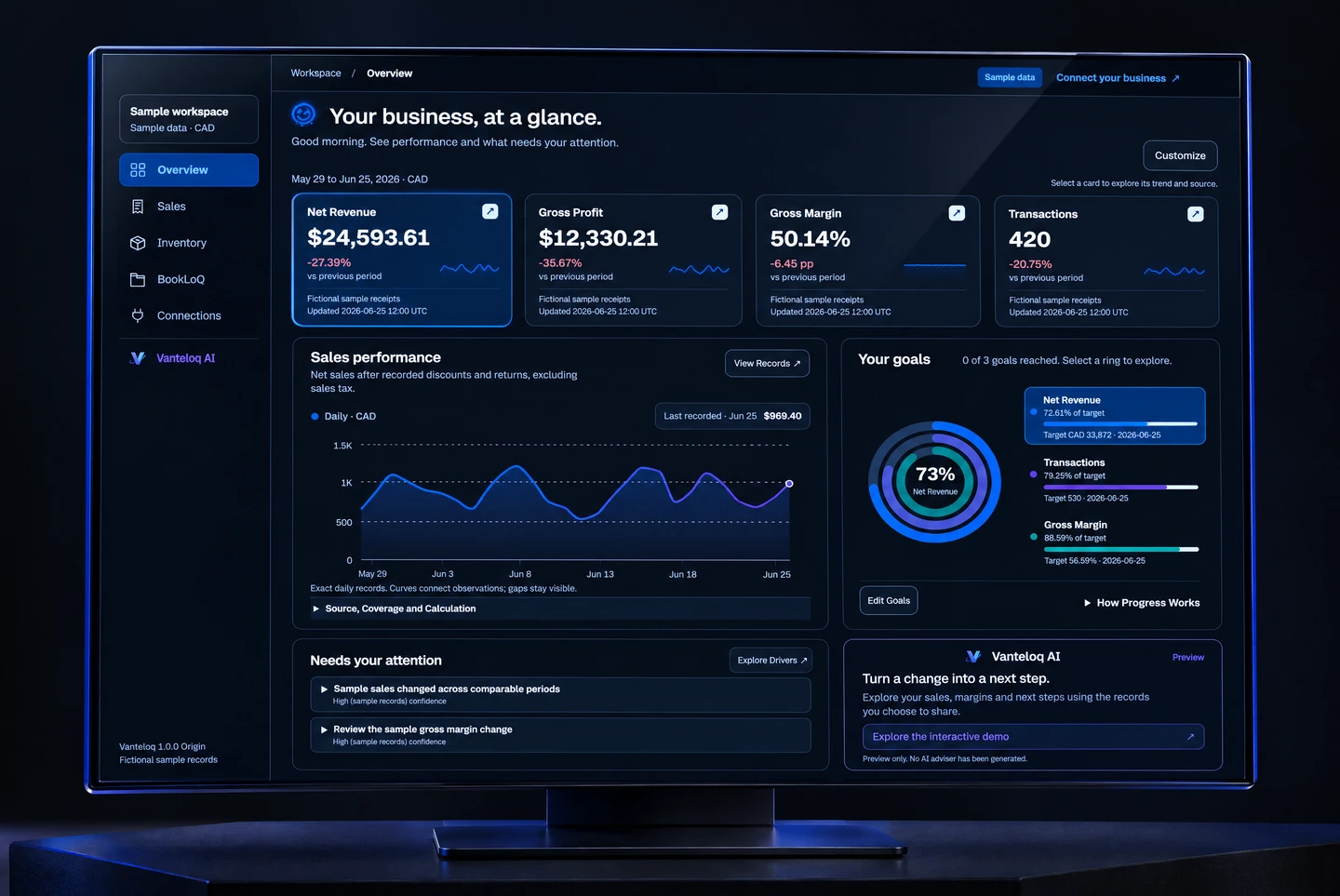
Vanteloq dashboard on a cinematic display, with sample sales, margins and goal rings.
Dashboard illustration · Sample data
EXPLORE YOUR DASHBOARD
Workspace OverviewSample dataConnect your business

Your business, at a glance.

Welcome back. See performance and what needs your attention.

Records through Jun 25 · Sample receipts

Performance overview

Sample Preview · Fictional Data · Changes stay in this preview

May 29 to Jun 25, 2026 · CADSelect a card to explore its trend and source.

Sales performance

Net sales after recorded discounts and returns, excluding sales tax.
Daily · CADLast recorded · Jun 25$969.40
05001K1.5KMay 29Jun 2Jun 6Jun 10Jun 14Jun 18Jun 25

Exact daily records. Curves connect observations; gaps stay visible.

Source, Coverage and Calculation

Data Sources

56 daily records
  • Fictional sample receiptsImport time unavailable
    $24,593.61
Net Revenue$24,593.61
Calculation

Completed sales after recorded discounts, less returns and refunds. Sales tax is excluded. Refunds are already included in these net amounts.

Only the selected sales sources are combined. Payments, payouts and bank deposits are not added as revenue. Import times reflect the oldest contributing record for each source; they do not imply complete coverage.

Source
Fictional sample receipts
Last Updated
2026-06-25 12:00 UTC
Confidence
high

Current: 2026-05-29 to 2026-06-25. Comparison: 2026-05-01 to 2026-05-28.

Sample records only. Not connected to a business account.

Budget variance requires a complete ledger budget covering these exact dates. POS and ledger totals are not interchangeable.

Net Revenue: In progressTransactions: In progressGross Margin: In progress73%Net Revenue

Your goals

0 of 3 goals reached. Select a ring to explore.
Net RevenueCAD 24,593.61 recordedTarget CAD 33,872
How Progress WorksTargets use their saved dates and location. Progress through 2026-06-25 follows eligible recorded data. Missing or incomplete inputs do not count as progress. The ring stops at 100%; the label preserves results above target. Ledger progress describes posted records, not an audit. Lower targets without a starting value show attainment only.

Needs your attention

Sample sales changed across comparable periodsHigh (sample records) confidence

What changed: Fictional net revenue was $24,593.61 across 420 transactions, compared with $33,872.00 across 530 in the previous 28 days.

Possible driver: The cause is not established. Transaction counts and average sale values describe the recorded difference; they do not establish why it happened.

Financial impact: Recorded net revenue changed by -$9,278.39. This is a sales comparison, not a cash-flow or net-profit result.

Next step: Open the sample sales records to compare transaction counts, basket values and recorded discounts across the same dates.

These are patterns in recorded data, not proof of a cause.

Review the sample gross margin changeHigh (sample records) confidence

What changed: Fictional gross margin was 50.14%, compared with 56.59% in the previous period.

Possible driver: The cause is not established. A comparison of item mix, recorded discounts and matched product costs is needed before attributing the change.

Financial impact: Recorded gross profit changed by -$6,837.99. Operating expenses, tax and financing are excluded.

Next step: Review the receipt lines and matched product costs in the sample sales report.

These are patterns in recorded data, not proof of a cause.

Invoices & Bills

Fictional documents. Try an aging bucket.

To Collect$18,640.00As of 2026-06-25 · 4 open records
What These Balances Include

Current recorded document balances, including tax, across all permitted workspace locations. They are separate from the trend chart’s reporting period. Payments and credits must be recorded. These totals can differ from posted ledger balances.

SALES COMPOSITION

Revenue by Source

Fictional sample receipts
$24,593.61

Selected sales sources only. Bank deposits and payouts are not added as revenue.

RECORDED ACTIVITY

Recent Daily Results

Latest recorded dates within the selected period
DateNet RevenueGross Profit
Jun 25$969.40$491.80
Jun 24$782.39$387.39
Jun 23$680.77$341.57
Jun 22$744.51$378.11
Jun 21$971.60$494.00

Missing dates and product costs remain visible. These are daily totals, not individual transactions.

Select a metric, explore its source or try Customize. Sample goals use previous-period results as illustrative targets, not business recommendations. Open the full demo

YOUR BUSINESS. YOUR PRIORITIES.

What changed? What needs your attention?

Open the records behind a finding. Review the next step, assign the work and follow the outcome. Missing costs and incomplete sources stay visible.

VANTELOQ IN MOTION

See the picture
come together.

Your sales. Your stock. Your next step. Bring the records into one clear view, then take the figures into an Excel review with Data Studio.

Explore the working demo Fictional sample records. Your workspace uses your own permitted data.
Vanteloq v1.0 OriginProduct preview · 12 seconds
Vanteloq’s dark commerce dashboard illustration with readable sample sales, profit and margin figures.
Your overviewThe source recordsData Studio

Vanteloq People

Every first day.
Every next step.

Your people work deserves the same clarity as the rest of your business. Bring the plan, the owner and the evidence into view.

Workforce planning, recruitment, onboarding, training and continuing people journeys are available in Team.

People, with a plan.Process illustration

One journey.
Thoughtful handoffs.

Plan A clear starting point

Define the role before the search.

Set out the work, the coverage needed and the person responsible for the next step.

Sample owner
Operations owner
Sample target
Illustrative evidence
Role scope and coverage notes

Sample process · Fictional dates and role owners. Select a phase to explore.

VANTELOQ DATA STUDIO

Your data.
Your own workspace.

Build dashboards, work in Sheets and explore supported SQL. Save your analysis, pin it to your overview and trace results to their sources.

Choose Data Studio in your workspace sidebar. Existing source, location and export permissions apply.
Executive ReviewFictional sample records · CAD
Recorded net sales$14,200
Recorded gross profit$5,200
Weighted gross margin36.6%

One review. Seven sheets. The source notes travel with it.

Choose the period and scope in Reports → Data Studio.

Seven sheetsPrecomputed valuesRead-only export
Net Revenue: In progressGross Margin: In progressTransactions: In progress82%Net Revenue

CAD 24,593.61 of 30,000 target

May 29 to June 25, 2026 · All sample locations
Fictional records · Your dashboard uses the same calculations

YOUR BUSINESS. YOUR GOALS.

Set the goal. See the progress.

Choose the numbers you want to improve, set a target and a date, and follow your progress. Your dashboard makes the next milestone visible while keeping missing information clear.

Choose your metricsSet your targetsFollow your progress
Explore your dashboard

TRY IT WITH SAMPLE RECORDS

Sales changed.
Show me why.

Choose a location. Watch the totals update. Follow the result into the baskets, products and discounts behind it.

Fictional records. Working calculations. No signup required.

Open the full demo
Northline Retail
SAMPLE STORE
NET SALES · MAY 29 TO JUN 25$24,594-27.4% vs previous 28 days
Transactions
420
Average basket
$58.56
Gross margin
50.1%

Weekly net sales

Compare each week with the corresponding week in the previous 28 days.

CAD · Sample
  • May 29 to Jun 25
  • May 1 to May 28
May 29 to Jun 25
$6,151.83
May 1 to May 28
$8,383.04
View data table
Weekly net sales. CAD. Fictional store records. Comparison values use the corresponding week in the previous period.
PeriodMay 29 to Jun 25May 1 to May 28
May 29 to Jun 4$6,151.83$8,383.04
Jun 5 to Jun 11$6,277.46$8,472.99
Jun 12 to Jun 18$6,012.49$8,632.93
Jun 19 to Jun 25$6,151.83$8,383.04
What changed behind the total?

Compare baskets, product mix and discounts. Open the records before deciding what to change.

Show me why
Fictional records · Working calculations · Try the location selector

CHECK YOUR FIT FIRST

Keep your POS.
Get more from its data.

Choose your system to see what it can support, what you need to connect and what is still in development.

Which system do you use?

Select a provider for setup details. All connections and availability are shown below.

Reports require authorization, a completed import and reviewed source totals.

Point of sale & online stores

Payments & banking

Accounting

Marketing

Delivery & labour

Collaboration

File imports

Not sure where to start? Select your system above or ask us about your requirements.

Third-party names, logos, trademarks, and service marks are the property of their respective owners. References to third-party products and services are for identification and interoperability purposes only and do not imply endorsement, sponsorship, or affiliation unless expressly stated. Integration availability, features, and data access may vary by provider, account type, region, and applicable third-party terms. Vanteloq is an independent platform and is not responsible for the availability, performance, or policies of third-party services.

THE CONNECTED WORKSPACE

One operating picture,
from source to decision.

POS recordsVanteloqYour next step
Sales intelligenceIllustrative interface
Net sales$4,860

96 transactions$50.63 average basket

Sales by hour2 p.m. peak
$780
8 a.m.Noon5 p.m.
Vanteloq AIDemand peaks at 2 p.m.

Use the hourly pattern to review staffing and stock availability.

VANTELOQ AI

Ask about your business.
Choose what AI can see.

Vanteloq AI is the assistant inside your business workspace. Work through sales, margins, cash forecasts or app questions using only the information you permit it to use, within your role’s access.
Business questions and app helpAsk about sales, inventory, marketing or BookLoQ. Get help finding a report or understanding your next step.
Your permission comes firstMemory starts off. Choose whether to share permitted business summaries, turn memory on or off, and delete saved chats in AI Settings.
Review important conclusions. AI does not replace your accountant or approve decisions for you.

BOOKLOQ · FINANCE WORKSPACE

A profitable month can still leave you short of cash.

Create an invoice, review what is owed and plan your next commitment. BookLoQ brings financial records and cash decisions into one workspace, on its own or alongside Vanteloq.

  • Keep collections visible. Create invoice PDFs and review outstanding balances and follow-ups.
  • Review before recording. Import a bank statement, inspect supporting documents and confirm matching records.
  • Know what your books contain. Set up your chart and periods, post balanced journals and review cumulative statements.
  • Look ahead. Plan 13 weeks of cash with dated commitments and visible assumptions.
INTERACTIVE EXAMPLE · CAD

What happens when an entry is missing?

Remove a fictional $1,000 debit and see which checks flag the difference.

LEDGER REVIEWFour arithmetic checks passedInspect checks
Debits equal creditsDebits − creditsBalanced
Assets equal liabilities plus equityAssets − liabilities − equityBalanced
Gross profit reconcilesOperating revenue − cost of goods sold − gross profitBalanced
Recorded earnings reconcileRevenue − recorded expenses − recorded earningsBalanced

Cumulative posted ledger balances. Balanced checks do not establish complete records, bank reconciliation, tax accuracy or an audit opinion. Recorded earnings include only the expenses entered in the ledger.

The same arithmetic checks used in BookLoQ. Fictional values, with no workspace records or AI request.

INSIDE YOUR WORKSPACE

See What’s Owed.
Know Where to Start.

Open an invoice. Follow a balance. Explore how the same records connect across your financial workspace.

Your Financial PictureFictional demonstration · CAD · As of Sep 27, 2026
Explore Overview

Money Due In & Out

Invoices DueBills Due
Week 1Week 2Week 3Week 4
Due dates are a planning guide, not guaranteed cash. $6,400 of fictional overdue invoices sit outside this schedule.

Balance Ageing

$24,800Receivables
Not Overdue$18,400Past Due$6,400
Start with the balance that needs attention

Northline has paid $2,000 of a $5,200 invoice. The remaining $3,200 is seven days overdue.

FILES YOU ALREADY USE

Keep Your Working Files Close to Your Numbers.

Import a daily CSV now. Private Google Sheets and Microsoft file connections are coming soon, with selected-file review before anything reaches your books.

Google Drive & SheetsComing Soon · Sheet tables and document copiesMicrosoft OneDriveComing Soon · Excel, Word and PowerPoint document copies
Interactive product preview. Sample figures are fictional. No records are saved.Explore the Demo

KNOW WHAT IS BEHIND THE NUMBER

Missing records should not look like a quiet day.

See what information is available, what needs review and who can access it.

The right people. The right access.

Keep your team’s work together while roles and location permissions control access to business and financial information.

Missing data stays visible

Missing costs do not become zero. An incomplete import does not prove the store was closed.

You own the decision

Vanteloq connects your business records to the decisions that need your attention. You review consequential actions and own the decision.

Privacy and deletionData processorsContact us

CHOOSE YOUR CAPACITY

One location or several. Start with what you need.

Choose the Vanteloq capacity that fits your operation, add BookLoQ, or use BookLoQ as its own finance workspace.
FREE · NO EXPIRY

Start with Free

Use your own records. No card required.

  • 1 owner and 1 location
  • 2 available integrations of your choice
  • 100 daily sales records per month via CSV or manual entry
  • 10 Vanteloq AI replies per month
  • Core dashboard, sales summaries and reports
  • No card required. No expiry.
Paid plans start with a 7-day trial.

Available on your workspace’s first subscription. Payment method required. Your selected plan renews monthly after the trial unless you cancel in Manage Billing before the first charge date shown at checkout.

For one location

Starter

$49 CAD / month

Understand daily sales and margins.

  • Up to 1 active location · 3 team members
  • Sales, margins and inventory basics
  • Vanteloq AI with response preferences
  • Source records and core reports
Try Starter free for 7 days →
For a growing team

Growth

$99 CAD / month

Bring inventory and a growing team into the picture.

  • Up to 3 active locations · 10 team members
  • Everything in Starter
  • Lots, expiry and supplier analytics
  • Revenue, demand and inventory forecasts
Try Growth free for 7 days →
For a larger operation

Pro

$179 CAD / month

Compare a larger operation with advanced reporting.

  • Up to 10 active locations · 25 team members
  • Everything in Growth
  • Forecast scenarios and commitments
  • Advanced location comparisons and exports
Try Pro free for 7 days →

Prices shown apply after the trial. Monthly billing, plus any applicable taxes shown at checkout. BookLoQ is available for $39 CAD with a Vanteloq plan or $59 CAD on its own. Compare every plan feature →

BOOKLOQ ON ITS OWN

Financial review without a Vanteloq plan

Use BookLoQ as a secured finance workspace for source documents, invoices, evidence matching, reviewed books and 13-week cash planning.

  • Up to 1 active location and 3 team members
  • Vanteloq AI can explain permitted BookLoQ summaries, but it cannot post, pay or approve decisions
Built Around Your Business

Need more locations or a custom scope?

Tell us about your locations, team and requirements. We’ll agree on the scope and price before checkout.

Request a Custom Plan

What happens next?

Visit the help centre →
Can I try it before signing up?

Yes. The demo uses fictional records and working retail calculations. It does not access customer records or send requests to an AI provider.

Open the demo →
Will it work with my POS?

Check the provider selector for current availability and supported data. Each business authorizes its own account, maps locations and reviews imported totals before relying on reports. CSV is an alternative where a supported template fits your records.

Check your system →
What happens after signup?

Verify your email, set up an authenticator and choose a plan. Select your business type and priorities during setup. Then add supported records, map locations and review the import. Reports show which records are available so you can see what is ready and what is missing.

Can I use BookLoQ without a Vanteloq plan?

Yes. BookLoQ is $59 CAD per month as a standalone finance workspace, or $39 CAD per month when added to a Vanteloq plan. It organizes financial records, journals, statements, transaction review, evidence matching and cash planning. It does not file tax returns or certify your books. Keep your accountant involved.

Can I make the dashboard my own?

Choose your metrics, reorder cards, adjust chart styles and save views for different priorities. Set goals with dates and a location scope. Your layout stays with your account in your workspace.

Can I control when my data updates?

Enable or pause automatic updates for supported connections. Review sync status and imported records before using the results.

Can I control what AI remembers?

Yes. Memory starts off. Choose whether to share permitted workspace summaries, turn memory on or off, and delete saved chats in AI Settings. AI access remains limited by your role.

Read the privacy details →
Can I change or cancel my subscription?

Open Stripe’s billing portal from workspace billing to review available changes or cancellation. Check the effective date and any prorated charges before confirming.

Start with a question you would ask about your own business.Open the demo →

BEHIND VANTELOQ

See what we’re building for the shop floor.

Product updates, practical retail questions and a closer look at the work behind Vanteloq.

Open the social hub

TikTok

@vanteloq.commerce

Scan to open Vanteloq on TikTok, or use the link below.

Short walkthroughs, practical store questions and product updates.

Browse articles27 practical guides · Open when you need them
Explore the resource library →